

Cursor vs Claude Code in 2026: IDE Agent vs Terminal Agent for Coding

Pick Claude Code if you want Claude models included in a flat plan and you are happy to give an agent a whole task. It starts at $20 a month. Pick Cursor if you want an AI code editor with Tab autocomplete. It has a free plan and paid plans from $8 a month, but Claude models now cost extra.
This cursor vs claude code for coding 2026 guide covers the IDE agent vs terminal agent choice, the current plans, and the pricing change that matters most. We checked every price below on Cursor's and Anthropic's own pages on November 9, 2026.
Cursor vs Claude Code at a Glance
| Cursor | Claude Code | |
|---|---|---|
| What it is | AI code editor | Coding agent |
| Main place you use it | Editor or Agents Window | Terminal, also VS Code, JetBrains, desktop app and web |
| Autocomplete as you type | Yes, Tab | No |
| Free plan | Yes, limited | No |
| Cheapest paid plan | $8 a month | $20 a month, or $17 billed yearly |
| Included models | Grok and Composer | Claude |
| Claude models | Premium and above, at API list price | Included |
| Runs in the terminal | Yes, Cursor CLI | Yes, this is where it started |
| Cloud agents | Yes, from Premium | Yes, on the web |
Plans and Prices
The biggest recent change is on Cursor's side. In October 2026 Cursor moved to plans shared with Grok. Each plan has one pool of usage for Cursor and Grok, and it refreshes every week.
| Cursor plan | Price per month | Usage | Claude, GPT and Gemini |
|---|---|---|---|
| Free | $0 | Limited | Not available |
| Plus | $8 | Base | Not available |
| Premium | $30 | 4x Plus | API list price, from prepaid credit |
| Super | $100 | 15x Plus | API list price, from prepaid credit |
| Ultra | $200 | 50x Plus | API list price, from prepaid credit |
| Teams | $30, $100 or $200 per seat | Matches the seat | API list price, plus a token fee on eligible models |
| Enterprise | Custom | Pooled | API list price, plus a token fee on eligible models |
Source: Cursor pricing and Cursor models and pricing docs, checked November 9, 2026.
| Claude plan | Price per month | Usage | Claude Code |
|---|---|---|---|
| Free | $0 | Limited | Not included |
| Pro | $20, or $17 billed yearly | More than Free | Included |
| Max | $100 | 5x Pro | Included |
| Ultra | $200 | 10x Pro each week, no 5-hour limit for verified accounts | Included |
| Team, standard seat | $25, or $20 billed yearly | More than Pro | Included |
| Team, premium seat | $125, or $100 billed yearly | 5x standard seat | Included |
| Enterprise | $20 per seat billed yearly, plus usage at API rates | Depends on use | Included |
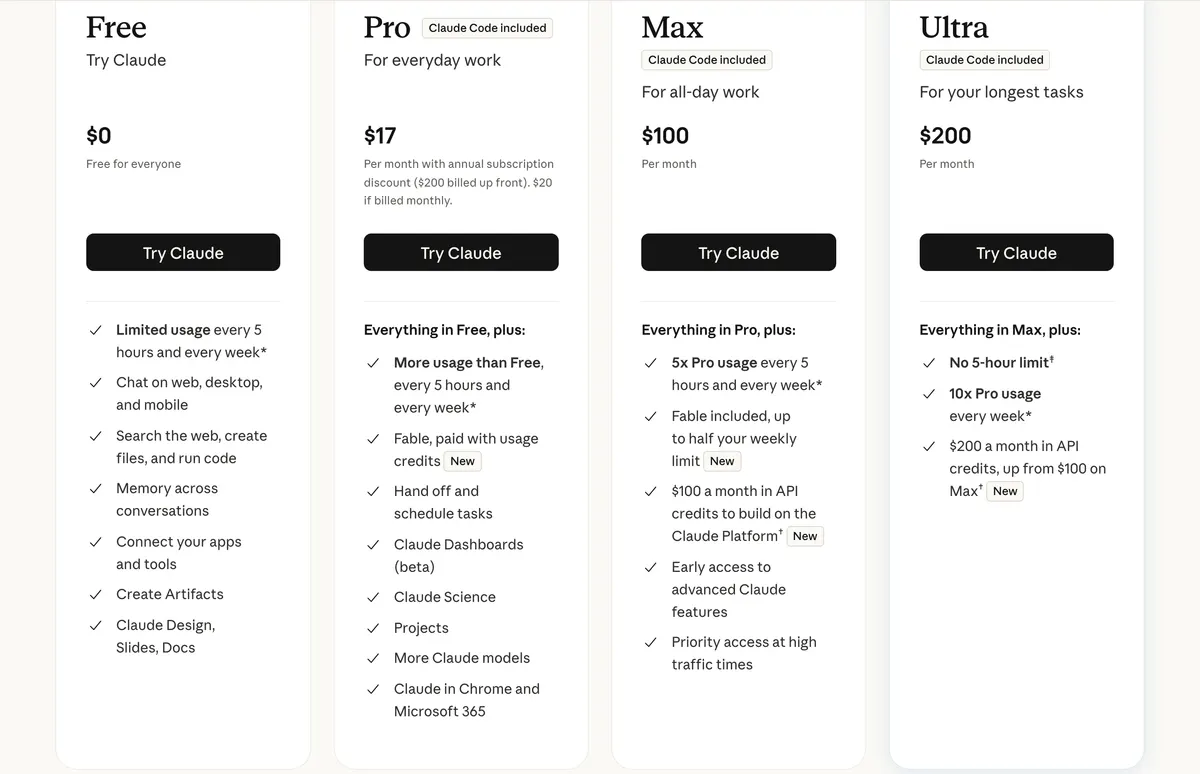
Claude Code is included from Pro up. Source: Claude pricing, captured November 9, 2026.
What this means for your bill
- You want Claude models. Claude Code is the simple choice. The plan covers them. In Cursor you need Premium or above, and you pay API list price from prepaid credit on top of the plan.
- You want the lowest price. Cursor's Free and $8 Plus plans cost less than any Claude plan with Claude Code. They only give you Grok and Composer models, and Plus does not list cloud agents.
- You are already on an older Cursor plan. Cursor says your included third-party usage continues until you switch. Older plans are closed to new sign-ups, so this only helps if you already have one.
IDE Agent vs Terminal Agent
An IDE agent works where you already edit code. You see each change in the file, and you accept or reject it there. A terminal agent runs in your shell. It reads the project on its own, works through the task, and you review the result as a diff.
This line is less sharp than it was. Cursor now has a CLI that runs in the terminal and in CI pipelines. Claude Code now has VS Code and JetBrains extensions, a desktop app and a web version. So the choice is less about which window you can use, and more about how you like to work and which models you want.
If you are new to these tools, read our Cursor beginner's guide or our explainer on Windsurf, another AI editor. To compare terminal agents, see Codex vs Claude Code, Copilot CLI vs Claude Code, and our roundup with Gemini CLI.
Cursor Agents vs IDE: Two Windows in One App
People often search for Cursor agents vs IDE, or Cursor IDE vs Agents Window. They are two views of the same product, as Cursor's docs explain.
- Editor (the IDE). The classic layout, with VS Code extensions and split views for reading many files at once. Use it when you write or read a lot of the code yourself.
- Agents Window. Built for running and managing many agents at once, on your machine, in the cloud or over SSH. Use it when agents write most of the code.
To switch, press Cmd+Shift+P and run "Open Agents Window" or "Open IDE". You can keep both open.
How Each One Works
Cursor: AI inside the editor
- Tab suggests code as you type. It can edit several lines, add missing imports and suggest your next edit.
- Agent plans and builds features across files, and you review the changes in the app.
- Cloud agents keep working when you close your laptop. They are listed from the Premium plan up.
You stay close to the code. The AI removes typing and searching.
Claude Code: an agent you give a task to
You open a project and describe the task. Claude Code then:
- Reads the codebase to find how things connect.
- Edits files and runs commands, including your tests, and can fix what fails.
- Works with git, so it can write commits and open pull requests.
You can add rules in a CLAUDE.md file, connect other tools with MCP, and run it in scripts with claude -p. On paid Claude plans the default model is Opus 5.5. Our Claude Code complete guide course is free and covers all of this.
When Each One Wins
Cursor is the better fit for:
- Reading unfamiliar code and asking about the file in front of you
- Small edits, where Tab autocomplete saves the most time
- Front-end work, where you want to see each change as it lands
- Approving every change yourself
Claude Code is the better fit for:
- Large repeated changes, such as renaming an API across a project
- Tasks that need many rounds of editing, testing and fixing
- Work you want to run in scripts or CI
- Using Claude models without paying API prices on top of a plan
Can You Use Both?
Yes. Claude Code has an official extension for Cursor, and it also runs in Cursor's built-in terminal. It uses your Claude plan, not your Cursor usage. This setup makes sense if you like Cursor's editor and Tab but want Claude models for the big tasks. The cost is two subscriptions, unless you stay on Cursor's free plan.
Which One to Pick
Pick Cursor if you:
- want AI suggestions right where you type
- want a free or low-cost way to start
- are fine with Grok and Composer models for most work
Pick Claude Code if you:
- want Claude models included in your plan
- often make large changes across many files
- are comfortable reviewing a finished diff
If you are a student or just starting out, begin with Cursor's free plan and learn Git first. Git lets you undo anything an agent gets wrong. Our free Git and GitHub course comes with a certificate.
Frequently Asked Questions
What is the main difference between Cursor and Claude Code?
Cursor is an AI code editor. You see code and edit it with AI help in one window. Claude Code is a coding agent that started in the terminal. You describe a goal, and it reads the project, edits files, runs commands and reports back. Both tools now have agents, so the main difference is where you work and how you pay.
Is Cursor better than Claude Code for coding in 2026?
Neither is better for every job. Pick Cursor if you want an editor with Tab autocomplete and you are happy with Grok and Composer models. Pick Claude Code if you want Claude models included in a flat plan and you are comfortable giving an agent a whole task.
How much do Cursor and Claude Code cost?
Cursor has a free plan, then Plus at $8, Premium at $30, Super at $100 and Ultra at $200 a month. Claude Code has no free plan. It comes with Claude Pro at $20 a month ($17 if billed yearly), Max at $100 and Ultra at $200. Plans change often, so check both pricing pages before you pay.
Are Claude models included in Cursor plans?
No, not on the current plans. The included usage covers Cursor models such as Grok and Composer. On Premium and above you can use Claude, GPT and Gemini at API list price, paid from prepaid credit. They are not available on Free or Plus. People who stay on an older Cursor plan keep its included third-party usage until they switch.
Can I use Cursor and Claude Code together?
Yes. Claude Code has an official extension that installs in Cursor, and it also runs in Cursor's built-in terminal. It uses your Claude plan, so its usage does not come from your Cursor plan.
What is the difference between Cursor agents and the Cursor IDE?
They are two windows in the same app. The Editor is the classic IDE, with VS Code extensions and split views. The Agents Window is for running and managing many agents at once, including cloud agents. You can switch from the command palette and keep both open.
What are IDE agents and terminal agents?
An IDE agent works inside your code editor, so you see changes in the files you have open. A terminal agent runs in your shell, reads the project and works toward a goal you describe. The line is less sharp now, because Cursor has a CLI and Claude Code has editor extensions.
Should a beginner start with Cursor or Claude Code?
Most beginners will find Cursor easier to start with, because it has a free plan and changes appear in the editor. Learn Git first. It lets you undo anything an agent gets wrong.
Last checked: November 9, 2026. Plans, models and limits change often. Check Cursor pricing and Claude pricing before you pay.
Enjoyed this article?
Join The FreeAcademy Weekly
One practical AI email every Tuesday. New free courses, AI tips, and a short note from the founder.
Free forever. Unsubscribe anytime.
Related articles
Codex vs Claude Code (2026): Prices, Limits and Which One to Pick
Codex vs Claude Code compared: both start at $20 a month, but only Codex has a free option. Plans, usage limits, safety defaults, and which to pick.

How to Use Cursor AI: A Complete Beginner's Guide (2026)
How to use Cursor AI from scratch. A step-by-step beginner guide to setup, key features, Chat and Composer, and getting the most from the editor.

What Is Windsurf? The Agentic AI Code Editor Explained (2026)
Discover what the Windsurf AI code editor is, how its agentic Cascade engine works, pricing, and how it compares to Cursor for AI-assisted coding in 2026.